BAVIS Maker: a free SCADA for the smart home and workshop
For makers, tinkerers and smart home enthusiasts. Screens like in industry, the history of every value, energy from your solar panels and a two-way bridge to Home Assistant. Free for non-commercial use, up to 5,000 tags.
Released. The Maker edition came out with the BAVIS 3.1.1 maintenance release. You activate it in the application under System → Licence → BAVIS Maker, with registration in BAVIS Central.
What's in the Maker edition
An industrial SCADA for your own projects
Maker is a full BAVIS with the functions that make sense at home and in the workshop. Not a cut-down trial.
Smart home
KNX, Home Assistant, Shelly, ESPHome, Tuya, BTHome, Loxone, Unipi and Tecomat, and from version 4.0 also Z-Wave, Philips Hue, iNELS, Jablotron, ONVIF cameras, air conditioners, Xiaomi devices and WLED LED strips. Lights, blinds, heating and plugs on screens that match your home.
Energy and solar
Energy management, inverters over SunSpec and wallboxes over OCPP. You know what you produce and where it goes. From version 4.0 also Victron and cars charged by your departure time.
Meters and consumption
M-Bus and wireless wM-Bus for water, heat and electricity meters. Consumption history by the hour and by the year.
Logic and schedules
Scripts, calculations and weekly schedules. Your home behaves sensibly even without the cloud.
REST, MQTT and Arduino
REST APIs of devices and services, such as 3D printers with OctoPrint or Moonraker. MQTT for Tasmota and Zigbee2MQTT. A text protocol for Arduino, ESP and your own devices on a serial line or TCP.
Industrial protocols
Modbus TCP / RTU, Siemens S7 and the OPC UA client are in every edition, plus SNMP for your NAS, router and UPS in Maker. Heat recovery, heat pump and the PLC in your workshop.
Screens and trends
A screen editor in the browser, symbols, a 3D floor plan, alarms and trends. On a computer, tablet or phone.
History of every value
Stored every second with compression, plus minute and hourly summaries. Last winter's temperature chart is two clicks away. If you use Grafana, send the data to InfluxDB as well.
BAVIS and Home Assistant together
A bridge to Home Assistant, both ways
You don't have to leave Home Assistant. BAVIS takes its entities as tags and returns its own tags as entities. Each system does what it is good at.
 BAVIS Makerscreens, history, alarms, energy, KNX, M-Bus, Modbus, S7
Home Assistant → BAVIS
The Home Assistant connection reads entities as tags, over WebSocket on every change. Writing a tag calls a Home Assistant service: turns on a light, sets a thermostat, lowers the blinds.
BAVIS → Home Assistant
Selected BAVIS tags show up in Home Assistant as entities via MQTT discovery. A meter on M-Bus or a value from a PLC can then trigger your automations.
Safely
Control from Home Assistant is off by default. When you turn it on, the same rights, limits and audit trail apply as for an operator.
BAVIS vs. Home Assistant
A fair comparison
Home Assistant is a great project, and we install it for our customers ourselves. BAVIS comes from industrial SCADA, so its strengths lie elsewhere. Here is the difference, point by point.
| Area | Home Assistant | BAVIS (Maker edition) |
|---|---|---|
| Focus | Home AssistantHome automation: devices, automations, scenes and voice control. | BAVIS (Maker edition)SCADA: visualisation, data acquisition, history, alarms and energy. The same core as in industry. |
| Licence and price | Home AssistantOpen source (Apache-2.0), free for businesses too. Backed by the non-profit Open Home Foundation. | BAVIS (Maker edition)Maker is free for non-commercial use. Businesses need a Standard licence. The driver SDK is open source (Apache-2.0). |
| Devices and integrations | Home AssistantA huge choice: more than 1,000 device brands according to home-assistant.io, plus more from the community. | BAVIS (Maker edition)Fewer brands, more protocols: KNX, M-Bus, wM-Bus, Modbus, S7, OPC UA, SunSpec, OCPP, Shelly, ESPHome, Tuya, MQTT, REST, SNMP, InfluxDB and a text protocol for Arduino and ESP, and from version 4.0 also Z-Wave, Philips Hue, ONVIF cameras, iNELS, Jablotron, cars, air conditioners, 3D printers, Victron, Raspberry Pi I/O, Zigbee via deCONZ, Nuki locks, OpenTherm boilers, RuuviTag sensors and data received via webhook. And everything from Home Assistant through the bridge. |
| Industrial protocols | Home AssistantOfficial Modbus and KNX integrations. | BAVIS (Maker edition)Modbus, Siemens S7, OPC UA and MQTT in every edition, plus KNX, M-Bus and wM-Bus in Maker. Tag browsing in the device and connection diagnostics. |
| Data history | Home AssistantDetailed history for 10 days by default (you can extend it), plus permanent hourly statistics for numeric sensors. | BAVIS (Maker edition)Every tag every second with compression, plus minute and hourly summaries. Trends, period comparison and export. |
| Screens | Home AssistantDashboards built from cards, quick to set up, with a large choice of community cards. | BAVIS (Maker edition)Process screens with symbols and a 3D floor plan, an editor in the browser, project templates. More work, more freedom. |
| Alarms | Home AssistantAutomations and notifications to the mobile app. | BAVIS (Maker edition)Alarms with acknowledgement, a fault history and escalating notifications, like in a control room. |
| Energy | Home AssistantEnergy dashboard: electricity, gas, water, solar, battery and individual devices. | BAVIS (Maker edition)Energy management, inverters over SunSpec and wallboxes over OCPP. In 3.1, an energy manager driven by spot price and forecast. |
| Users | Home AssistantOwner, administrator and regular user. | BAVIS (Maker edition)Administrator, operator and viewer roles, plus an audit trail of who switched what and when. |
| Mobile and voice | Home AssistantOfficial Android and iOS apps, the Assist voice assistant. | BAVIS (Maker edition)A web interface in the phone's browser, no app needed. Voice through Home Assistant, in 4.2 also via Siri, Alexa and Google. |
| Installation | Home AssistantHome Assistant OS on its own device or in a virtual machine, or Container. | BAVIS (Maker edition)An installer for Windows. In 4.0, Raspberry Pi, Linux, Docker and a Home Assistant OS add-on. |
| Remote access | Home AssistantA paid cloud subscription from the makers of Home Assistant, or your own VPN or tunnel. | BAVIS (Maker edition)In 3.1, a guide to access without a VPN (Tailscale, Cloudflare Tunnel). In 4.0, paid remote access through BAVIS Central. |
| Community | Home AssistantOne of the largest open source communities, a forum, guides and thousands of add-ons. | BAVIS (Maker edition)A young project. A public SDK for your own drivers and the community repository BAVIS-SDK. |
marks which system is stronger in that area
Home Assistant details according to home-assistant.io as of 1 Nov 2026. Home Assistant is a project of the Open Home Foundation; BAVIS talks to it only through its public API. BAVIS features marked with a version are in preparation.
When to choose what
Home Assistant, BAVIS, or both?
Home Assistant is enough
- you mainly control lights, plugs and scenes
- you have devices of many brands over Zigbee, Matter and Wi-Fi
- you want voice control and a mobile app
BAVIS Maker fits
- you have KNX, M-Bus meters, heat recovery or a PLC
- you want a long history and charts over years
- you want control room screens and alarms with acknowledgement
Most often both
- Home Assistant handles devices, voice and automations
- BAVIS handles screens, history, energy and meters
- the bridge links them both ways, you don't give up anything
What it looks like
A smart home in BAVIS
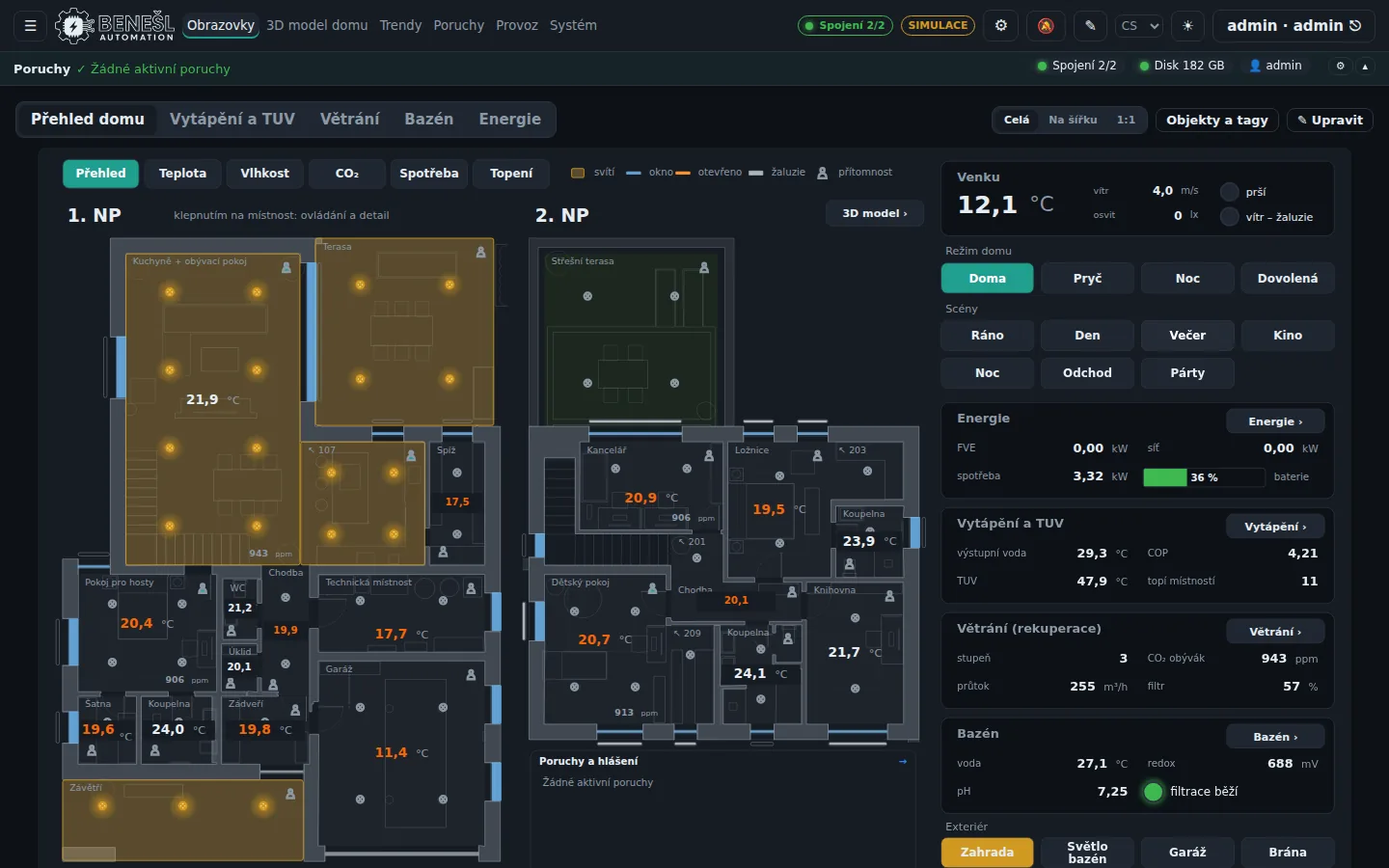
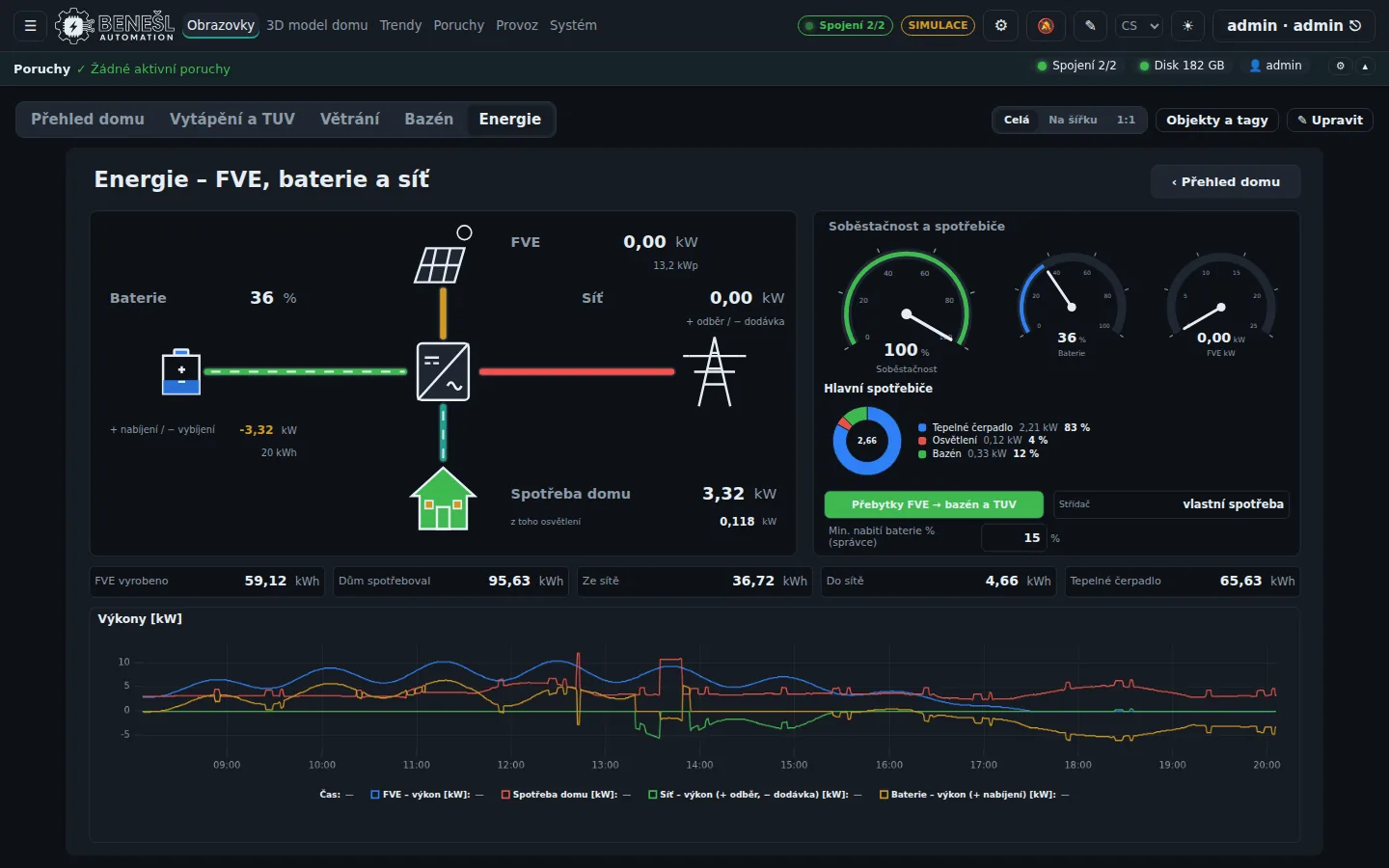
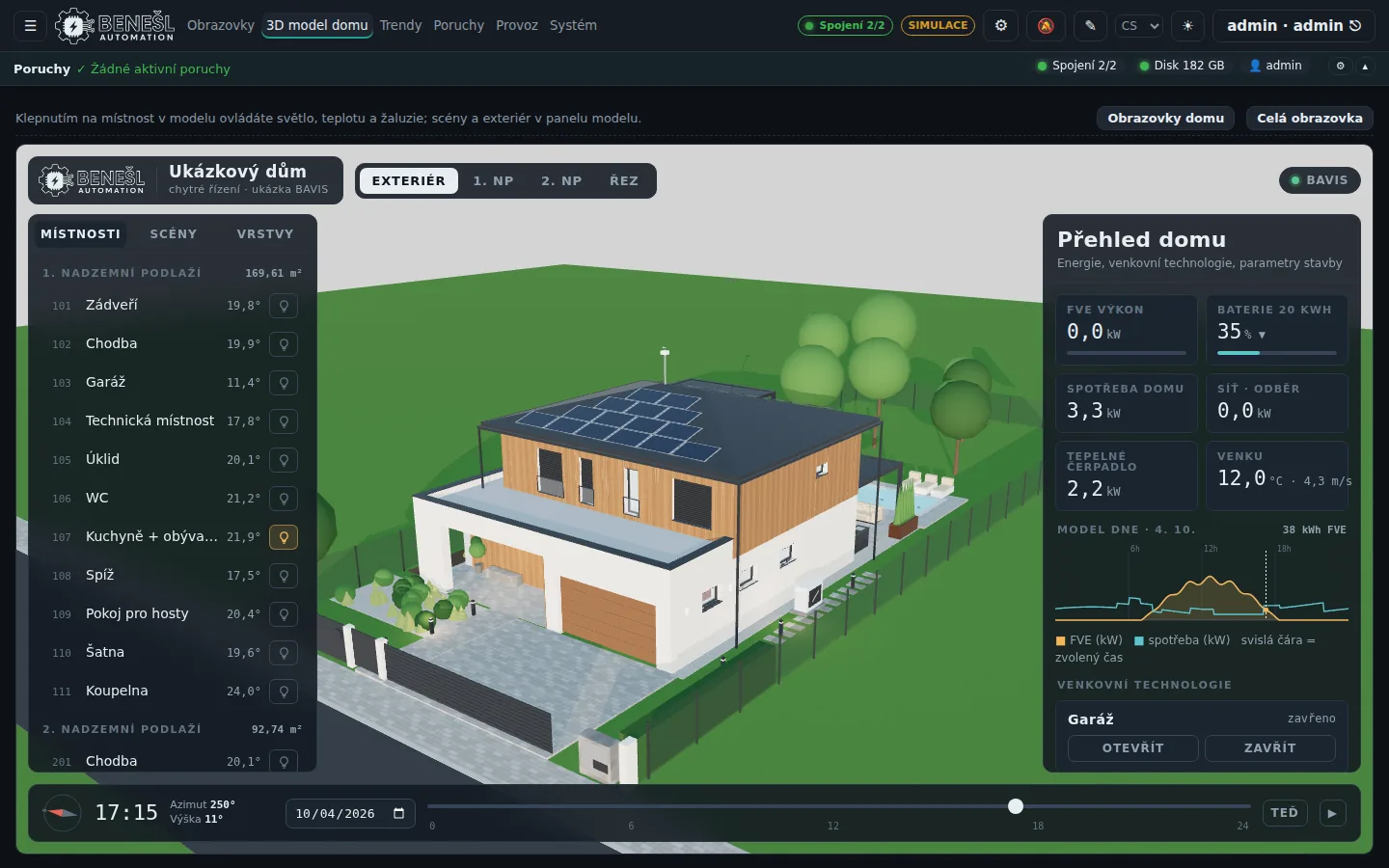
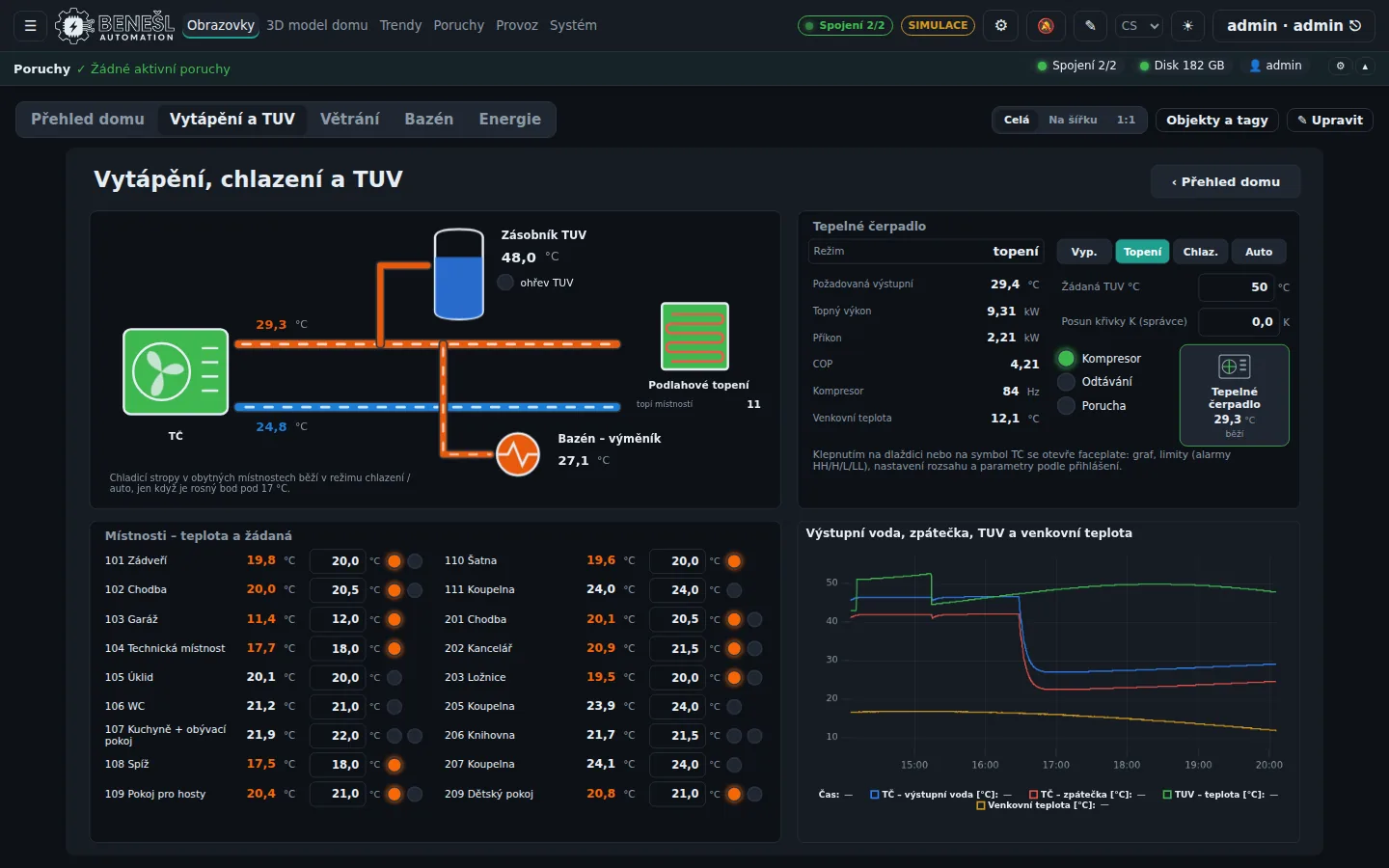
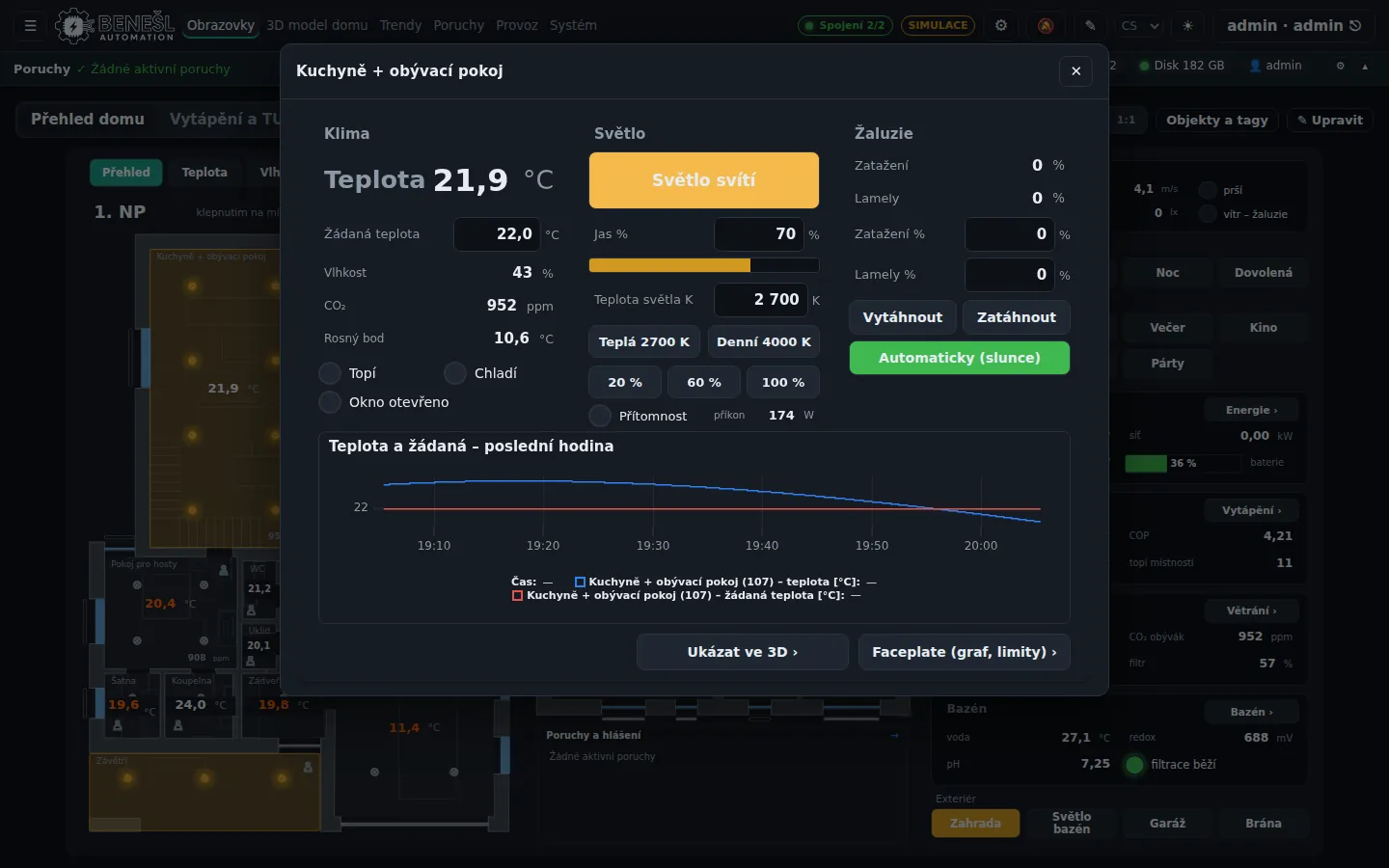
Screenshots from the smart home demo. You can try the same demo in your browser, no installation needed. Try the smart home demo
What's coming for makers
Release order
Home drivers
The Home Assistant bridge, Shelly, Zigbee2MQTT, ESPHome, the energy manager, remote access without a VPN and notifications via ntfy, Pushover and Discord.
Maker launch
Released: the Maker edition, free for non-commercial use, up to 5,000 tags. Activation right in the application, with no licence file.
Linux and the home
Raspberry Pi including its pins and sensors, Linux and Docker, a Home Assistant OS add-on, and in Maker Z-Wave, Philips Hue, ONVIF cameras, iNELS, Jablotron, cars, air conditioners, Xiaomi, 3D printers, Victron, WLED and Ecowitt weather stations. The “My home” wizard with the scanner and device kits, who is home and a map, device simulators and paid remote access through BAVIS Central. Renault, Dacia, Toyota and Lexus can also be connected with the account from the manufacturer's app. This is an unofficial route that must be explicitly enabled in BAVIS, and the manufacturer may change or block it at any time.
Matter inside
Matter devices directly in BAVIS, without another hub.
By voice
BAVIS in Matter and HomeKit, control via Siri, Alexa and Google.
SCADA for makers and Home Assistant
Looking for a Home Assistant alternative, or rather a companion? BAVIS Maker is a web SCADA for the smart home, the workshop and hobby projects. It runs on your own computer or server, the data stays at home and you control it from a browser.
It links with Home Assistant both ways: entities from Home Assistant, such as Zigbee sensors, ESPHome modules or Shelly relays, appear in BAVIS as tags. BAVIS tags, such as a wM-Bus water meter, an M-Bus electricity meter or a solar inverter, show up in Home Assistant as entities via MQTT discovery.
For DIY projects on a Raspberry Pi, ESP32 or Arduino there is MQTT, HTTP / REST, Modbus and a text protocol on a serial line or TCP. If you want your own protocol, write a driver in Python with the public SDK. A KNX house, heat recovery on Modbus, a heat pump, a wallbox or a 3D printer, all on one screen with history.
Frequently asked questions
Is BAVIS a replacement for Home Assistant?
More of a companion. Home Assistant is strong in devices, automations and voice; BAVIS in screens, history, alarms, energy and industrial protocols. The bridge links them both ways. If you don't use Home Assistant, you can run BAVIS on its own.
How much does BAVIS Maker cost?
Nothing for non-commercial use, up to 5,000 tags. Small non-commercial projects up to 150 tags are also covered by the Lite edition. Commercial use needs a Standard licence.
What is sent to BAVIS Central?
Maker is switched on by registering with BAVIS Central, without a licence file. The installation then reports regularly with summary data: versions, counts and the drivers used. It never sends values, tag names or device addresses.
Will BAVIS run on a Raspberry Pi?
Yes, from version 4.0 together with Linux and Docker. Today BAVIS runs on Windows.
Does BAVIS work with Zigbee and ESPHome?
Yes. Zigbee through Zigbee2MQTT and MQTT, ESPHome directly, or both through the Home Assistant bridge. BAVIS supports both since version 3.1.
Will you install Home Assistant or BAVIS for me?
Yes. We design, install and connect smart homes with Home Assistant and with BAVIS, including KNX, solar and metering. Tell us what you have at home.
Turnkey smart home
Would you rather do it with us?
We design and install Home Assistant, BAVIS or both, and connect KNX, solar, the wallbox and the meters.
The Maker edition applies from BAVIS 3.1.1; functions marked with a later version are in preparation. Home Assistant is a trademark of its owner. Siemens and S7 are trademarks of Siemens AG.