Request a quote
Benešl Automation / BaLib libraries
SCL libraries for TIA Portal

BaLib – ready-made SCL blocks for S7-1500 and S7-1200

BaLib is a family of 18 licensed SCL block libraries by Benešl Automation. It covers communication and telecontrol, process objects, building and home automation, and energy metering and data logging.

Devices, points and parameters are entered in data blocks, not in program code. The licence is perpetual and bound to one CPU – no dongle and no internet connection.

products, each with its own licence
18
TIA Portal, one library per version
V17–V21
CPU families: S7-1500, S7-1200, S7-1200 G2
3
automated logic tests in a simulator
≈ 6 500

Why BaLib

The library holds the functions that keep coming back in projects for production, buildings and machines, built so that they can be deployed without changing program code.

Configured by data, not by code

Devices, jobs, points and parameters are rows in data blocks. Adding a meter or a telecontrol point means adding a row to a DB, not rewriting the program.

Only SCL and standard Siemens instructions

No DLLs, add-ons or external libraries. The blocks use instructions that ship with TIA Portal – TCON, TSEND, TRCV, Send_P2P and others.

One interface for three CPU families

S7-1500 including ET 200SP CPUs, classic S7-1200 from firmware 4.5 and S7-1200 G2. CPU differences are handled inside the blocks; your program stays the same.

No dongle, no internet

A perpetual licence per CPU. The block verifies the code directly in the PLC, so it works on machines and stations that will never be online.

Buy only what you need

Each of the 18 products is a separate library with its own licence. One licence code can hold several products for the same CPU.

Tested and documented

The logic of all products is checked by about 6,500 automated tests in a simulator. Every release is compiled and know-how protected in TIA Portal V17–V21 for S7-1500, S7-1200 and S7-1200 G2 before it is shipped. Every product comes with a manual including a quick start and wiring examples.

S7-1500S7-1200S7-1200 G2TIA Portal V17V18V19V20V21

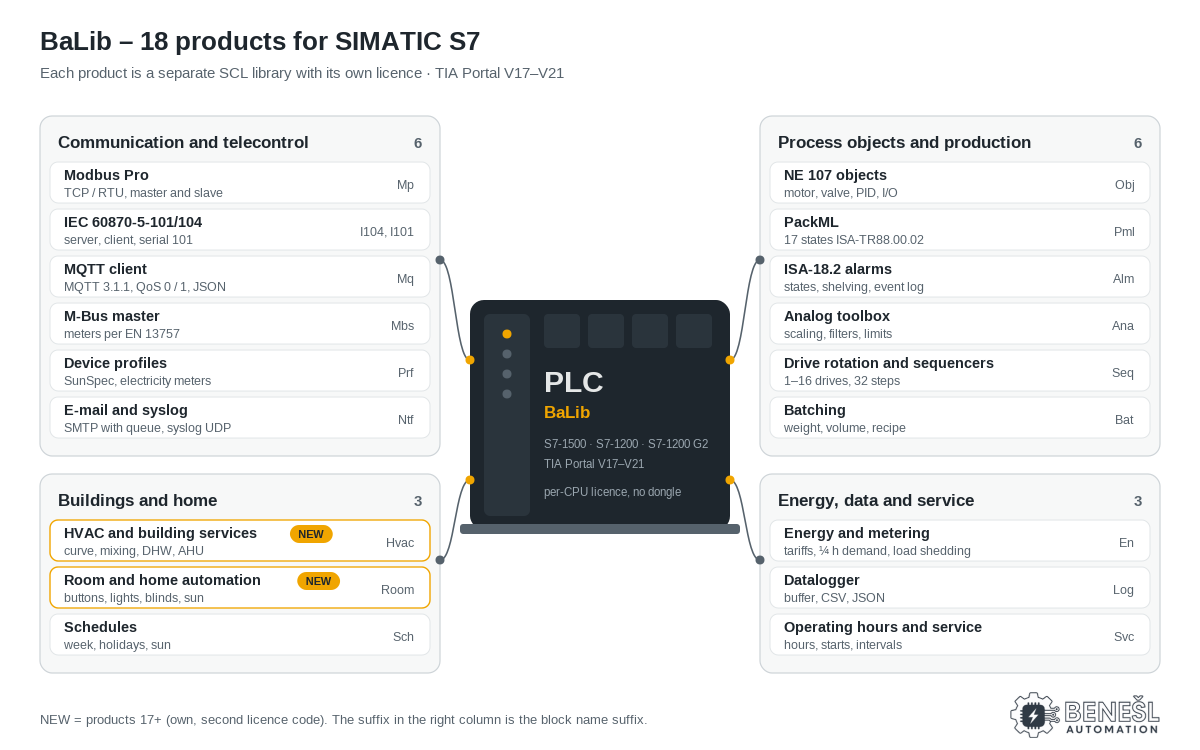
18 products in four groups

Each product is a separate library for TIA Portal V17–V21 with blocks for S7-1500, S7-1200 and S7-1200 G2.

Map of the 18 BaLib products in four groups around a PLC

Communication and telecontrol

The PLC as a telecontrol station for the dispatch centre, a Modbus master for meters and inverters, an MQTT client for higher-level systems, M-Bus for meter reading and e-mail with syslog for notifications. All set up as tables in DBs and built on standard TIA Portal instructions.

Modbus Pro

Modbus TCP and RTU, master and slave – all communication set up as a table in a DB.

  • Modbus TCP client and server, Modbus RTU master and slave (CM PtP, CB 1241)
  • Jobs in a DB: function, addresses, cyclic, on request or write on data change only
  • Register-to-value conversion: Int16 to Int64, Real32/64, bits, byte and word order, scale and offset
  • Quality for every value with a reason (stale data, job error, invalid number)
  • Health of up to 16 slaves; an unreachable device does not slow down the others

fbBaMp…

IEC 60870-5-101/104 new: 101 and master

Telecontrol for the dispatch centre and for controlling subordinate stations – from one PLC.

  • IEC 104 controlled station: server for one connection or up to 4 (redundancy group or independent masters)
  • IEC 104 controlling station: master with a primary and a backup station address
  • IEC 101 slave and master over a serial line, unbalanced and balanced mode, master for up to 8 stations
  • Points, commands and events in DB tables; CP56Time2a time tags, direct and select-before-execute commands
  • S7-1500 and S7-1200; no TLS – use VPN and a firewall on external networks

fbBaI104… fbBaI101…

MQTT client

The PLC publishes and subscribes to topics using standard TCP instructions.

  • MQTT 3.1.1, QoS 0 and 1, retain, last will, online and offline messages
  • Topics as rows in a DB, JSON objects built from several values
  • Subscriptions with + and # wildcards, a new-message flag on every row
  • Automatic reconnect with increasing back-off, diagnostics for the HMI
  • No TLS and no QoS 2 – broker on the local network or via VPN

fbBaMq…

M-Bus master

Reading heat, water, gas and electricity meters per EN 13757.

  • Serial via CM PtP or CB 1241 with an M-Bus level converter, or via a TCP gateway
  • Generic DIF / VIF decoding – no per-vendor register map needed
  • Primary addresses 0–250, multiple telegrams per device, bus scan
  • Supervision of every meter: health, validity and age of data
  • Meter list and value mapping as data in a DB

fbBaMbs…

Device profiles

Inverters and energy meters described by data, not by code.

  • A profile is a table of points in a DB: register, type, byte order, scaling, unit
  • Ready-made profiles: SunSpec models (inverters, meters, nameplate, MPPT), Eastron SDM630 and SDM120 / SDM230
  • Builds the Modbus Pro jobs itself and returns values in engineering units with quality
  • Free slots for your own profiles; another meter of the same type = one more block call
  • Add-on for Modbus Pro

fbBaPrf…

E-mail and syslog

PLC events to e-mail and to a syslog server.

  • SMTP client with a message queue, retries and an hourly message limit
  • Up to 16 events per block: signal edge → e-mail with text, value and time
  • Reminders, escalation and an end-of-event message with duration
  • Syslog over UDP (RFC 3164 / RFC 5424) with a severity filter
  • No TLS: mail goes through an internal SMTP relay on the company network

fbBaNtf…

Process objects and production

Building blocks for process plants and machines: motors, valves and controllers with NAMUR NE 107 diagnostics, a PackML state machine, ISA-18.2 alarm management, analog signal processing, drive rotation and batching.

NE 107 objects

Ten process objects with common diagnostics per NAMUR NE 107.

  • Motor, motor with VFD, valve, control valve, analog and binary input and output, interlock, PID with auto-tuner
  • Auto, Manual, Off and Local modes; simulation and reset from the HMI
  • F / C / S / M status with the top-priority cause and a word of all active causes
  • One interface structure per object for the HMI and faceplates
  • Feedback supervision, start limits, counters and maintenance

fbBaObj…

PackML

Machine unit state machine per ISA-TR88.00.02 / OMAC PackML.

  • 17 states, commands, modes and Stop, Abort, Hold and Suspend conditions
  • Command priority and a rejection code for the HMI
  • State and mode times, stop reason, product counters and machine speed
  • PackTags-style image for MES and OPC UA

fbBaPml…

ISA-18.2 alarms

Alarm management over an array in a DB: state model, shelving, suppression and log.

  • ISA-18.2 states, four priorities, acknowledgement per alarm, per area or all
  • Shelving, suppressed-by-design, out of service, first-out, chattering and stale
  • Ring event log with operator id, statistics and flood detection
  • HMI list with filter and paging, table of the most frequent alarms
  • PLC diagnostics (OB82, OB83, OB86 …) and support for hot-swapping modules

fbBaAlm…

Analog toolbox

From the raw module value to a clean quantity for control and the HMI.

  • Scaling with range presets (4..20 mA NE 43, 0..10 V …) and sensor diagnostics
  • Filters, HH / H / L / LL limits with hysteresis and delay, rate of change, totaliser, statistics
  • Table linearisation, selection from redundant sensors including 2oo3, ramp and PWM
  • Channel supervision with good / uncertain / bad quality
  • Flow from differential pressure with gas compensation, analog output conditioning

fbBaAna…

Drive rotation and sequencers

Cascade and rotation of 1 to 16 drives plus a lightweight step sequencer.

  • Rotation by run time, number of starts or time; duty, standby and peak units
  • Takeover on failure and exercise runs of drives that have stood still for long
  • Minimum run and rest times, starts per hour limit, run feedback supervision
  • Step sequencer with up to 32 steps as an alternative to GRAPH

fbBaSeq…

Batching

Dosing by weight or volume with pre-act learning.

  • Coarse and fine valve; gain-in-weight, loss-in-weight or volume from a flow meter
  • Pre-act with automatic learning, tolerances and time supervision
  • Recipes with up to 8 ingredients: order, parallel dosing, mixing, discharge, repeated batches
  • On any unclear condition the blocks close the valves immediately

fbBaBat…

Buildings and home

New products for building services and PLC-controlled family houses: heating circuits, hot water and air handling (HVAC) and push buttons, lights, blinds, shading and room control (Room and home automation). Schedules with holidays and sun calculation complete the group.

HVAC and building services NEW

Heating circuits, hot water and air handling from ready-made blocks.

  • Heating curve with damped outdoor temperature, summer cut-off, setback and boost heating
  • Mixing circuit with an analog or 3-point valve, pump overrun and anti-seize run, screed drying programme
  • Domestic hot water tank: charging, priority, circulation and weekly legionella disinfection
  • Air handling unit: heat recovery, heating, cooling, frost protection, fire mode
  • PI controller and 3-point actuator with a position model

fbBaHvac…

Room and home automation NEW

Push buttons, lights, blinds, shading and room temperature from the PLC.

  • Push buttons: click, double and triple click, long press with repeat, stuck-button detection
  • Switched, dimmed (0–10 V) and staircase lights; scenes, presence and darkness
  • Venetian blinds, roller shutters, awnings and window drives with a position and slat model; wind, rain and frost take priority
  • Sun position (NOAA) and automatic facade shading with sun-tracking slats
  • Room temperature control: PWM for thermal actuators, cooling with dew-point protection, floor temperature limit

fbBaRoom…

Schedules

Weekly schedules with holidays and sun times, independent of CPU settings.

  • Weekly schedule with up to 16 channels, intervals across midnight
  • Czech public holidays, custom calendar, holidays and shutdowns
  • Optimum start with a learned heating rate
  • Cycle timer and sunrise and sunset by geographic position
  • Edit buffer for the HMI with an edit lock

fbBaSch…

Energy, data and service

Consumption metering by tariff, quarter-hour demand and load management, data logging to CSV and JSON, and tracking of operating hours and service intervals.

Energy and metering

Consumption by tariff, quarter-hour demand and load management.

  • Pulse meter S0, HSC counter, cumulative meter register or power integration
  • Consumption per hour, day, month and year; tariffs by time and ripple-control signal
  • Quarter-hour demand with forecast, priority-based load shedding, staged switch-on
  • Energy cost and a balance of the main meter against sub-meters

fbBaEn…

Datalogger

Ring buffer, CSV to the memory card and JSON for MQTT.

  • Buffer of 256 records with 16 values, time stamp and flags
  • Sampling periodically, on change, on trigger or aligned to the clock
  • CSV writing via DataLog with file rotation and card error handling
  • JSON for MQTT or REST; identical number formatting on all CPUs

fbBaLog…

Operating hours and service

Run hours, starts and service intervals for the whole machine.

  • Manager for up to 32 devices in a DB array
  • Intervals in run hours, number of starts and calendar days
  • Warning, due and overdue states; service confirmation from the HMI
  • Operating hours per hour, day, month and year

fbBaSvc…

Each product shows the prefix of its blocks in TIA Portal. All 18 products at once may not fit into the work memory of small CPUs, for example the S7-1200 1214C; measure the actual memory use on the target CPU.

Home and building on a PLC

The Room and HVAC products bring to the S7-1500 and S7-1200 what houses usually get from a separate bus system or single-purpose controllers: wall push buttons, lights, blinds, sun-following shading, room control, heating circuits and hot water.

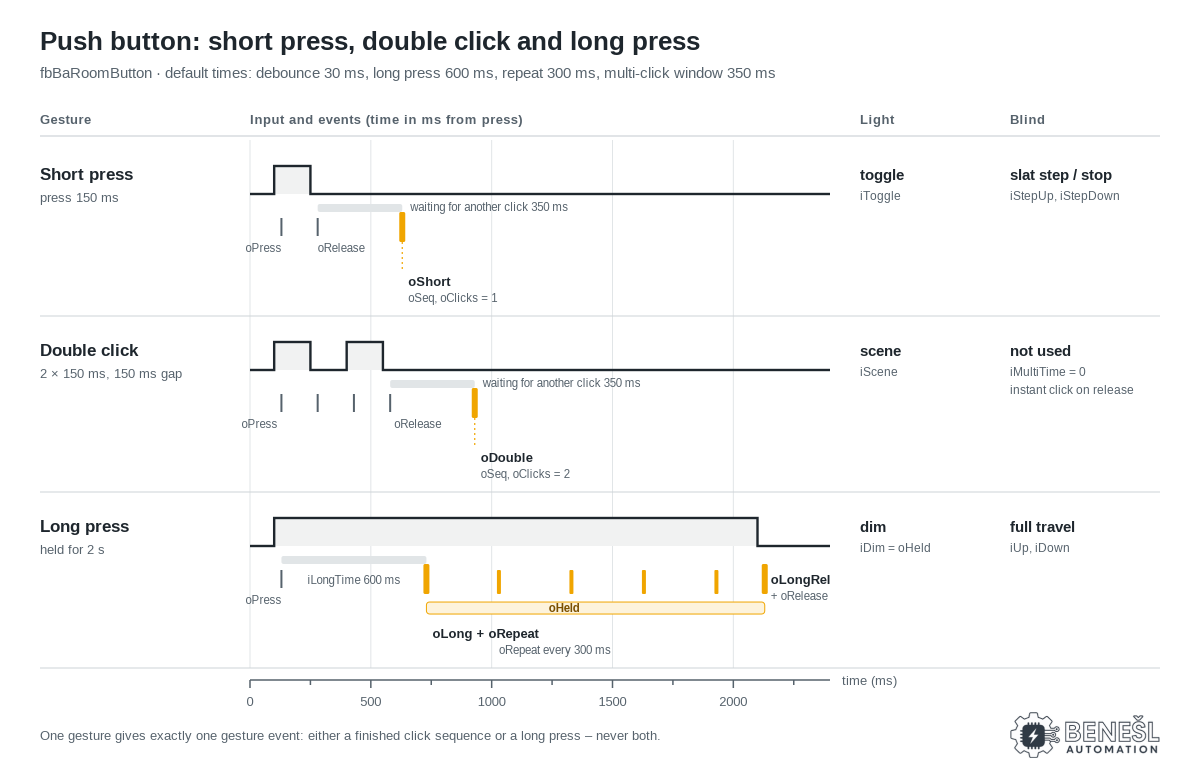
The blocks behave the way people know from KNX systems – a short press toggles or steps, a long press dims or travels all the way, a double click recalls a scene.

Push-button gestures on a time axis and their use for a light and a blind

A typical family house

One PLC, digital inputs for buttons and sensors, relays for blinds and lights, analog outputs for dimming and valves. The whole house is assembled from blocks, wired together in OB1:

  1. Wall push buttons. fbBaRoomButton tells a click from a double click and a long press. In the living room a click toggles the light, holding dims it and a double click recalls a scene. On blind buttons a short press stops or turns the slats, a long press travels to the end. A central button in the hall: short press switches the house off, long press raises all blinds.
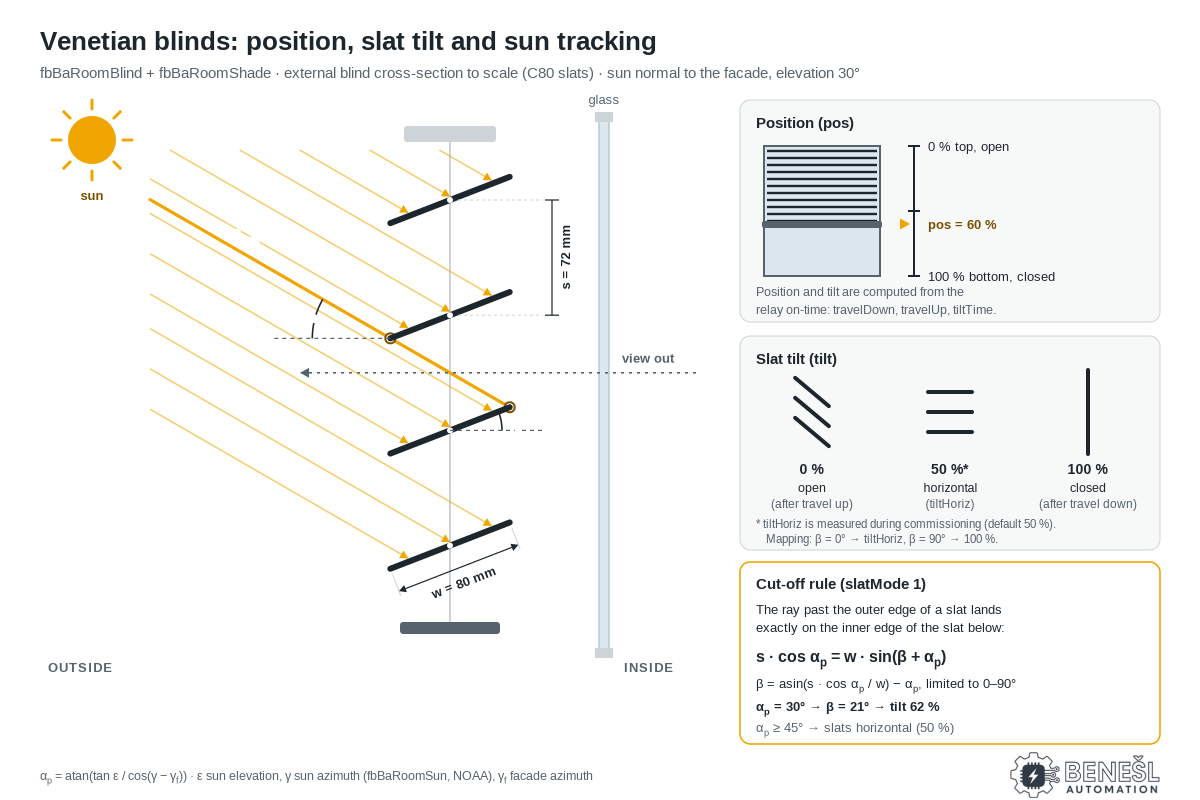
  2. Blinds that follow the sun. fbBaRoomSun computes the sun azimuth and elevation from the CPU clock (NOAA algorithm). fbBaRoomShade decides when to shade a facade and tilts the slats just enough to block direct sunlight while keeping the view. The weather station takes priority: in wind the blinds go up and stay locked.
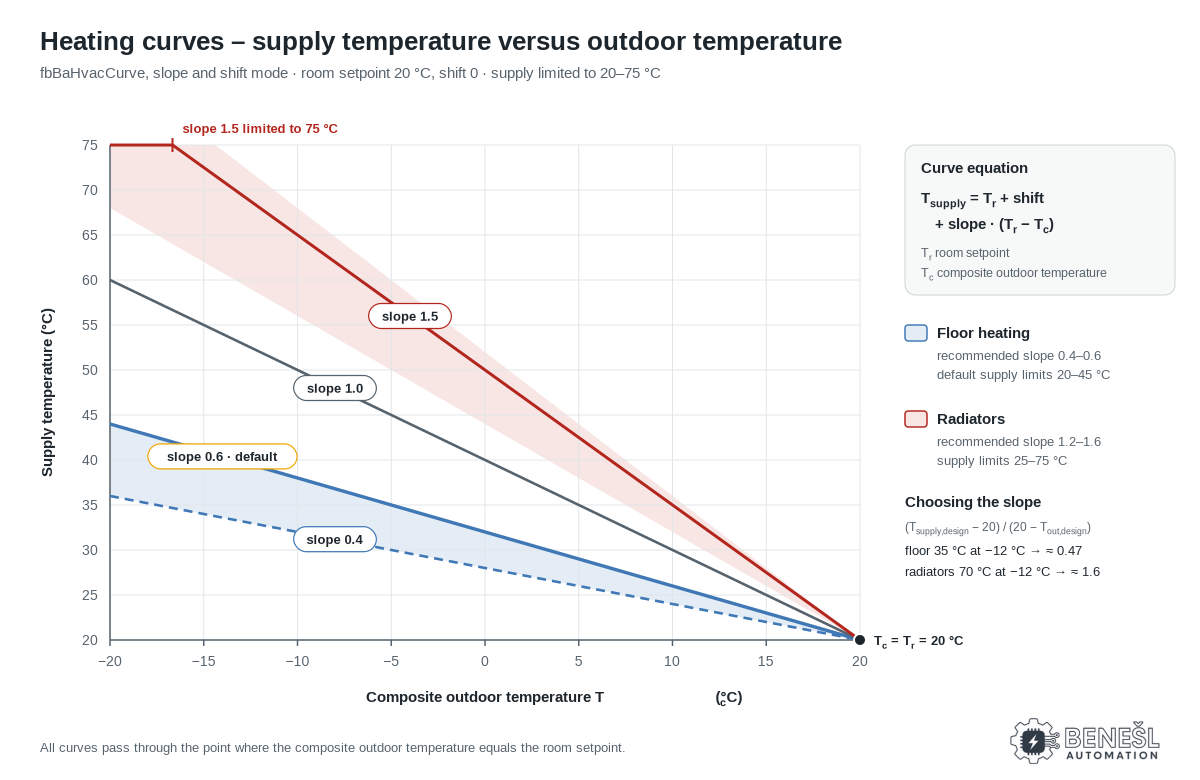
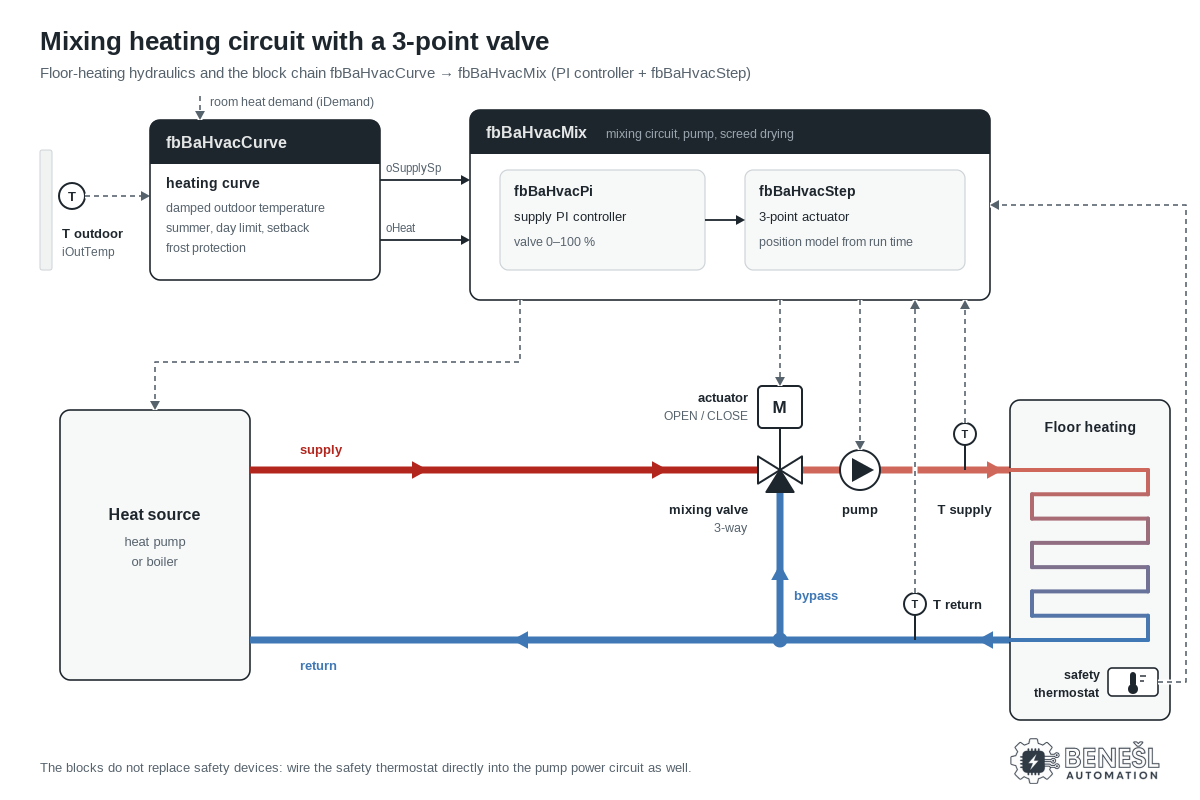
  3. Floor heating with a heat pump. Outdoor sensor → heating curve fbBaHvacCurve → mixing circuit fbBaHvacMix with a 3-point valve. In the rooms fbBaRoomTemp drives thermal actuators with PWM, limits the floor temperature and, when the heat pump cools, watches the dew point. The room demand goes back to the curve.
  4. Domestic hot water. fbBaHvacDhw charges the tank through the heat pump diverter valve, gives hot water priority and runs a weekly thermal disinfection against legionella (default 65 °C for 30 minutes) with a stored result.
  5. Presence and lights. Motion sensors occupy a room; in the bathroom a door contact helps (the “wasp in a box” principle). The hallway lights up by presence and darkness, the living room has a dimmed light with scenes.
Blind cross-section: position, slat tilt and the cut-off rule
Heating curves for slopes 0.4 to 1.5
Mixing heating circuit and the block chain

What else

  • Air handling with heat recovery, heater and cooler (fbBaHvacAhu), including frost protection and fire mode.
  • Schedules with holidays and vacations (the Schedules product) for comfort and setback times.
  • Values to a higher-level system over MQTT (the MQTT client product), for example to Home Assistant or Node-RED.

Note: The blocks do not replace safety devices. Frost and legionella protection work only with a valid licence, so do not run real equipment in demo mode, and wire safety and frost thermostats directly into the power circuits as well.

IEC 60870-5-104 and 101 telecontrol

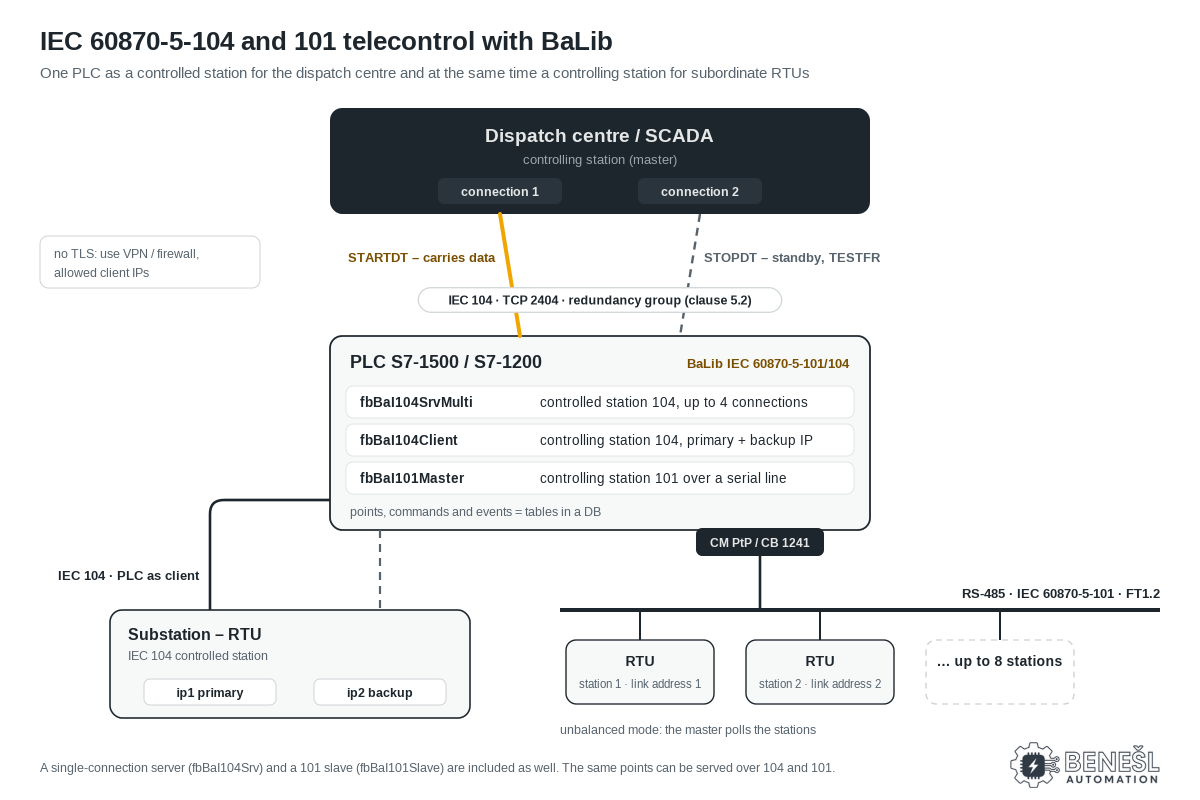
Connecting a PLC to a dispatch centre usually means buying a dedicated communication processor or a separately licensed software add-on. BaLib IEC 60870-5-101/104 is a regular SCL block library on standard instructions: IEC 104 runs over the CPU's built-in PROFINET interface, IEC 101 over a CM PtP or CB / CM 1241 serial module. It is licensed like every other BaLib product – perpetually, per CPU.

Topology: dispatch centre with a redundant IEC 104 link, the PLC as IEC 104 client of a substation and IEC 101 master over RS-485

Controlled station (104 server)

Single and double points, normalised, scaled and floating-point measurands, counters; spontaneous transmission with CP56Time2a time tags. Direct and select-before-execute commands, general interrogation, clock synchronisation.

Redundancy

fbBaI104SrvMulti serves up to 4 connections on the same port over the same tables: a redundancy group per IEC 60870-5-104 clause 5.2 (the STARTDT connection carries data; unacknowledged events are resent after a takeover) or independent masters.

Controlling station (104 master)

fbBaI104Client connects to a subordinate station with a primary and a backup IP address, runs general and counter interrogation, synchronises the clock and sends commands from a DB table.

IEC 101 over a serial line

Slave and master, unbalanced and balanced mode, FT1.2 link layer, configurable address field lengths. In unbalanced mode the master serves up to 8 stations.

One application layer

IEC 101 and 104 share the same ASDU types and time tags. The same points can be served over 104 and 101, and both masters share the tables of received points and commands.

S7-1200 as well

The blocks run on S7-1500 and S7-1200. The single-connection server is kept small on purpose; on an S7-1200 check memory use after compiling.

The 104 link is plain TCP without TLS (IEC 62351 is not implemented). Outside a trusted network use a VPN or a firewall and restrict the allowed client IP addresses.

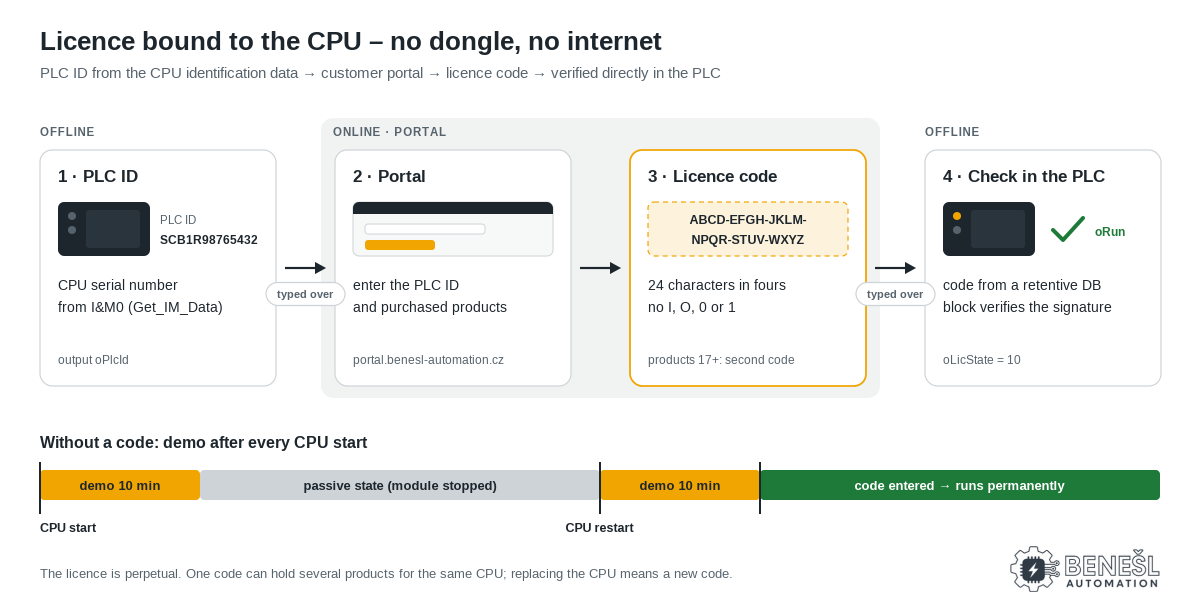
How licensing works

The licence is perpetual and bound to one CPU. You need neither a USB key nor an internet connection – the block verifies the code directly in the PLC.

  1. Deploy and run

    Add the blocks to your project and download the program to the CPU. Without a code each product runs as a demo for 10 minutes after a CPU start.

  2. Read the PLC ID

    The oPlcId output shows the CPU serial number from the I&M0 identification data – in a watch table or on the HMI.

  3. Generate the code

    Enter the PLC ID in the customer portal and select the purchased products. You get a 24-character code; products 17+ (HVAC, Room) get a second code.

  4. Enter the code in the PLC

    Store the code in a retentive data block. Once verified, the product is licensed permanently – also after a power cycle.

Licensing steps: PLC ID, portal, licence code, check in the PLC; 10-minute demo after a CPU start
  • One code can hold several products for the same CPU.
  • Replacing the CPU means a new PLC ID and therefore a new code.
  • You can also send the PLC ID and the product list by e-mail to benesl@benesl-automation.cz.

We prepare a price and quote based on the products and the number of CPUs – just send an enquiry via the form. Online sales are coming soon.

Portal login and registration Request a price

What is included

The library package, documentation and access to the customer portal. You can download the demo project in the portal after a free registration.

Library package

  • A global library of the product for TIA Portal V17 to V21
  • Folders for S7-1500, S7-1200 and S7-1200 G2
  • Blocks with know-how protection

Documentation

  • Product manual in Czech and English
  • A complete manual of all 18 products
  • Wiring, HMI interface and quick start

Customer portal

  • Overview of purchased units by product
  • Generating licence codes for your CPUs
  • History of issued codes
Open the customer portal

Demo project

All 18 products in one TIA Portal project. Download the demo project from the Downloads section of the customer portal.

  • A ready-made program to import into TIA Portal for S7-1500 and S7-1200 G2, with a variant for the classic S7-1200.
  • Needs no inputs or outputs: signals come from a simulated mixing tank and the building of a demo factory – an office with lighting, blinds, floor heating, hot water and air handling.
  • Data blocks prepared for an HMI. Communication (Modbus, IEC 104 / 101, MQTT, M-Bus, e-mail, syslog, CSV) is wired up but switched off until you enable it.
  • The demo manual walks through product by product: what to set and what you will see.

10-minute demo after every CPU start

Without a licence code all products run for 10 minutes from the CPU start, then switch to a passive state. A CPU restart (STOP → RUN) gives another window. One simulated batch takes about 4 minutes, so it fits into the window.

The demo is sized for an S7-1500. On an S7-1200 remove the areas you do not need so that it fits into the work memory.

Download the demo project in the portal

Quality and testing

Every release goes through automated tests and is compiled in all supported TIA Portal versions.

Compilation in TIA Portal

On 12 October 2026 we compiled all 18 products and the demo project in TIA Portal V17–V21 for S7-1500, S7-1200 and S7-1200 G2 without errors. A trial release with know-how protected blocks also passed without errors in all versions.

Logic in a simulator

The logic of all 18 products is checked by about 6,500 automated tests in an SCL simulator.

Documentation and support

Every product comes with a manual in Czech and English with a quick start, a description of states and wiring examples. We are happy to help you with commissioning.

BaLib libraries are not intended for safety functions; those belong in the safety program of an F-CPU.

Frequently asked questions

Didn't find your answer? Write to us.

Which TIA Portal versions are supported?

TIA Portal V17, V18, V19, V20 and V21. We supply a separate global library in a ZIP package for each version.

Which CPUs are the libraries for?

S7-1500 including ET 200SP CPUs, classic S7-1200 from firmware 4.5 and S7-1200 G2 (from TIA Portal V20). The block interface is the same for all families.

Will BaLib fit into an S7-1200?

It depends on how many products you use and how large you make the arrays in the configuration DBs. All products at once may not fit into a small CPU (such as a 1214C). Use only the products you need and check memory use in Program info after compiling.

Do I get the source code?

No. The blocks are know-how protected with a password: you see their interface, not the source code. You set the behaviour through inputs and DB configuration; your own program is not restricted in any way.

How do updates work?

New library versions are available in the Downloads section of the customer portal, per TIA Portal version. A new version goes into the project by overwriting the blocks; interface changes are listed in the release notes. The licence code is bound to the CPU and product, not to the library version.

Do I need a licence for every CPU?

Yes, a licence covers one CPU. For another CPU you generate another code in the portal. One code can hold several products for the same CPU; replacing the CPU means a new code.

Does the licence work without internet?

Yes. The code is a cryptographic signature (HMAC-SHA-256) over the PLC ID and the product list and is verified directly in the block in the PLC. The PLC never connects to the portal and no dongle is needed.

Why do I have two licence codes?

Products 17+ – HVAC and building services and Room and home automation – are licensed with a second code. If you use products from both groups, you get two codes for your CPU; the portal issues them together and shows which products each one unlocks.

How is the library tested?

The logic of all 18 products is checked by about 6,500 automated tests in an SCL simulator. The current version of all 18 products and the demo project compile in TIA Portal V17–V21 for S7-1500, S7-1200 and S7-1200 G2 without a single error. Every release is compiled again before shipping, before and after know-how protection.

Where do I get support?

Every product has a manual with a quick start, a description of states and wiring examples. Send questions to benesl@benesl-automation.cz or call +420 732 413 773.
Try BaLib on your own CPU

Tell us which products you need. We will send the library to try in demo mode or the demo project, and prepare a quote.

Siemens, SIMATIC, TIA Portal, S7-1500, S7-1200 and STEP 7 are trademarks of Siemens AG. BaLib is a separate product of Benešl Automation and is not a product of Siemens. Other names are trademarks of their respective owners.