Solar and battery control in BAVIS
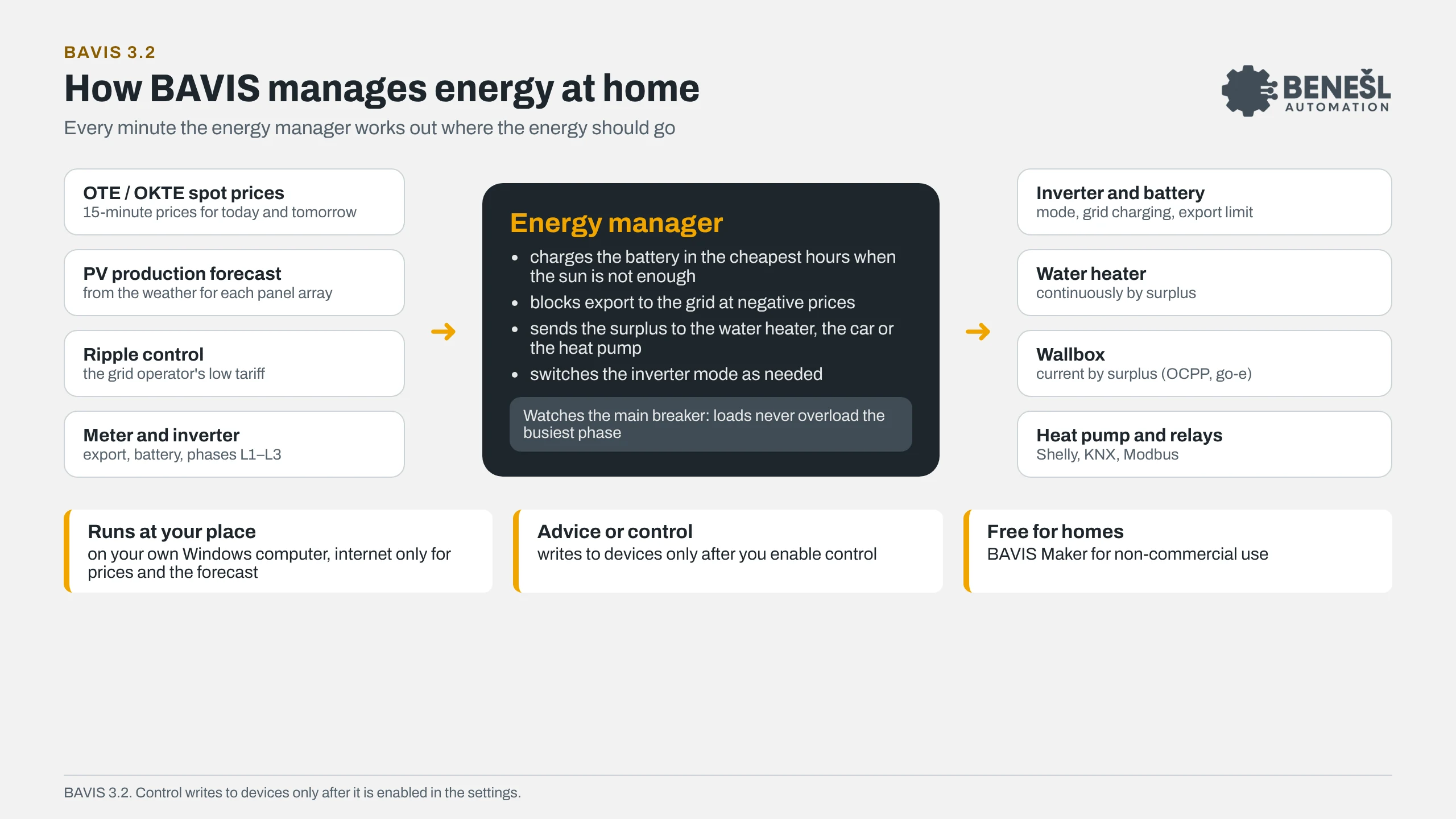
The BAVIS energy manager charges the battery in the cheapest hours, blocks export at negative prices and sends the surplus to the water heater, the car or the heat pump. Based on OTE and OKTE spot prices, the production forecast and ripple control, while watching the main breaker.
From version 3.1. The current version is 3.2. For homes it is free in the BAVIS Maker edition (non-commercial use).
Energy manager
What it does every minute
The inputs are prices, the weather, ripple control and measurements from the meter and inverter. The outputs are the inverter, the battery and the loads worth running when energy is cheap or spare.
Prices and forecast
15-minute OTE and OKTE spot prices in CZK at the CNB rate, an Open-Meteo production forecast for each panel array and the ripple control schedule.
Battery and export
Charging from the grid in the cheapest hours when the sun is not enough. At negative prices it blocks export and switches the inverter mode.
Surplus to loads
The water heater continuously by surplus, the wallbox via OCPP 1.6J or go-e, the heat pump by price, surplus and ripple control.
Breaker protection
It watches the L1–L3 phase currents and loads never overload the busiest phase of the main breaker.
Comparison
BAVIS 3.2 and SunDayGate
SunDayGate is a proven Windows app for controlling home solar power with GoodWe and other inverters. BAVIS 3.2 does the same essentials: battery and export control by OTE and OKTE spot prices, a production forecast and continuous use of the surplus for the water heater and the car. On top of that it watches the main breaker per phase, controls the heat pump by price and ripple control and charges through any OCPP wallbox. From version 4.0 it will also run on Linux and Raspberry Pi. And because it is a complete SCADA system, you can add anything else: KNX, Modbus, M-Bus, Home Assistant or your own screens.
Energy control
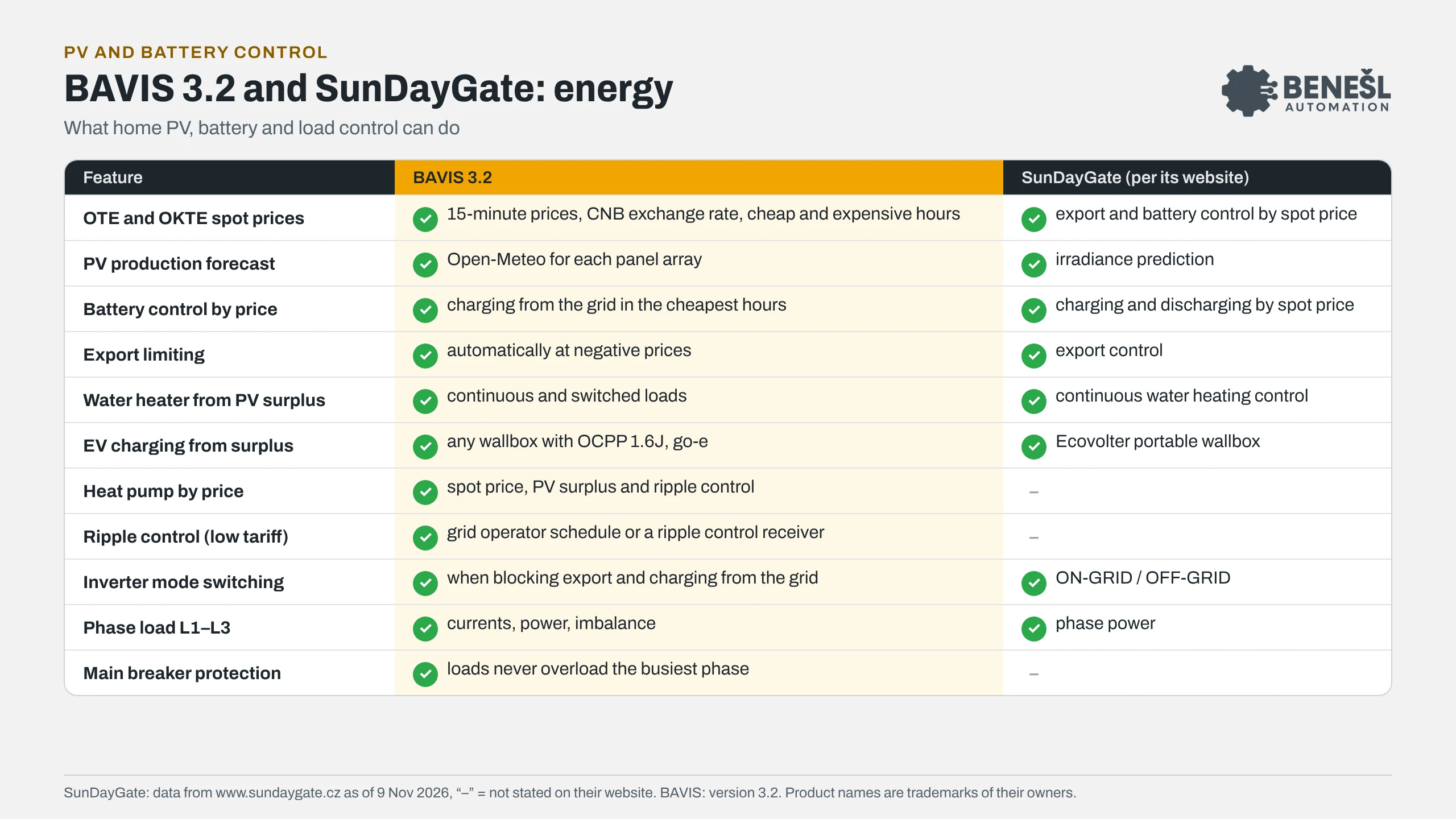
| Feature | BAVIS 3.2 | SunDayGate (per its website) |
|---|---|---|
| OTE and OKTE spot prices | BAVIS 3.215-minute prices, CNB exchange rate, cheap and expensive hours | SunDayGate (per its website)export and battery control by spot price |
| PV production forecast | BAVIS 3.2Open-Meteo for each panel array | SunDayGate (per its website)irradiance prediction |
| Battery control by price | BAVIS 3.2charging from the grid in the cheapest hours | SunDayGate (per its website)charging and discharging by spot price |
| Export limiting | BAVIS 3.2automatically at negative prices | SunDayGate (per its website)export control |
| Water heater from PV surplus | BAVIS 3.2continuous and switched loads | SunDayGate (per its website)continuous water heating control |
| EV charging from surplus | BAVIS 3.2any wallbox with OCPP 1.6J, go-e | SunDayGate (per its website)Ecovolter portable wallbox |
| Heat pump by price | BAVIS 3.2spot price, PV surplus and ripple control | SunDayGate (per its website)–not stated on their website |
| Ripple control (low tariff) | BAVIS 3.2grid operator schedule or a ripple control receiver | SunDayGate (per its website)–not stated on their website |
| Inverter mode switching | BAVIS 3.2when blocking export and charging from the grid | SunDayGate (per its website)ON-GRID / OFF-GRID |
| Phase load L1–L3 | BAVIS 3.2currents, power, imbalance | SunDayGate (per its website)phase power |
| Main breaker protection | BAVIS 3.2loads never overload the busiest phase | SunDayGate (per its website)–not stated on their website |
Platform
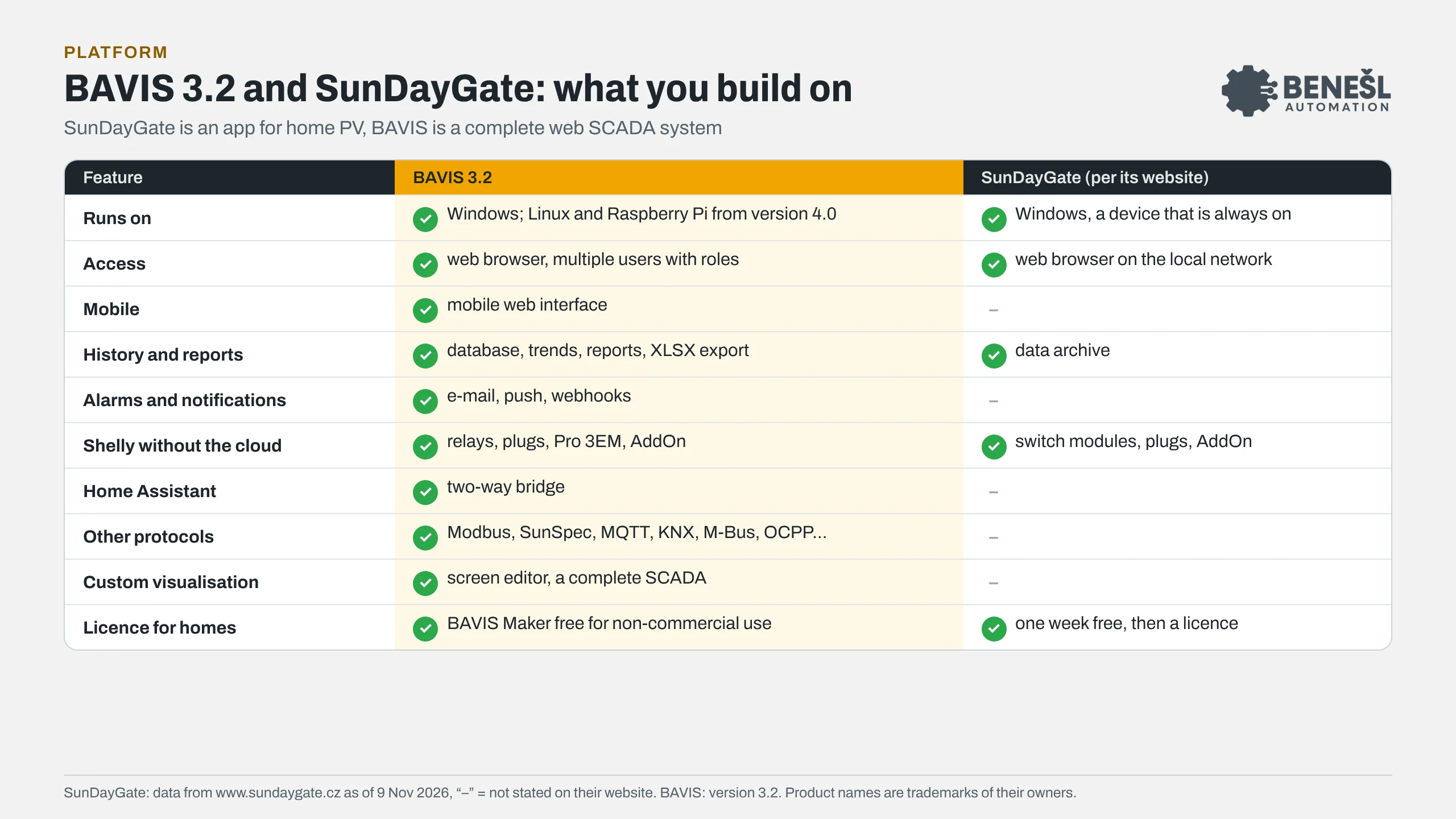
| Feature | BAVIS 3.2 | SunDayGate (per its website) |
|---|---|---|
| Runs on | BAVIS 3.2Windows; Linux and Raspberry Pi from version 4.0 | SunDayGate (per its website)Windows, a device that is always on |
| Access | BAVIS 3.2web browser, multiple users with roles | SunDayGate (per its website)web browser on the local network |
| Mobile | BAVIS 3.2mobile web interface | SunDayGate (per its website)–not stated on their website |
| History and reports | BAVIS 3.2database, trends, reports, XLSX export | SunDayGate (per its website)data archive |
| Alarms and notifications | BAVIS 3.2e-mail, push, webhooks | SunDayGate (per its website)–not stated on their website |
| Shelly without the cloud | BAVIS 3.2relays, plugs, Pro 3EM, AddOn | SunDayGate (per its website)switch modules, plugs, AddOn |
| Home Assistant | BAVIS 3.2two-way bridge | SunDayGate (per its website)–not stated on their website |
| Other protocols | BAVIS 3.2Modbus, SunSpec, MQTT, KNX, M-Bus, OCPP… | SunDayGate (per its website)–not stated on their website |
| Custom visualisation | BAVIS 3.2screen editor, a complete SCADA | SunDayGate (per its website)–not stated on their website |
| Licence for homes | BAVIS 3.2BAVIS Maker free for non-commercial use | SunDayGate (per its website)one week free, then a licence |
feature is listed not stated on the SunDayGate website, which does not mean it cannot do it
What you can connect
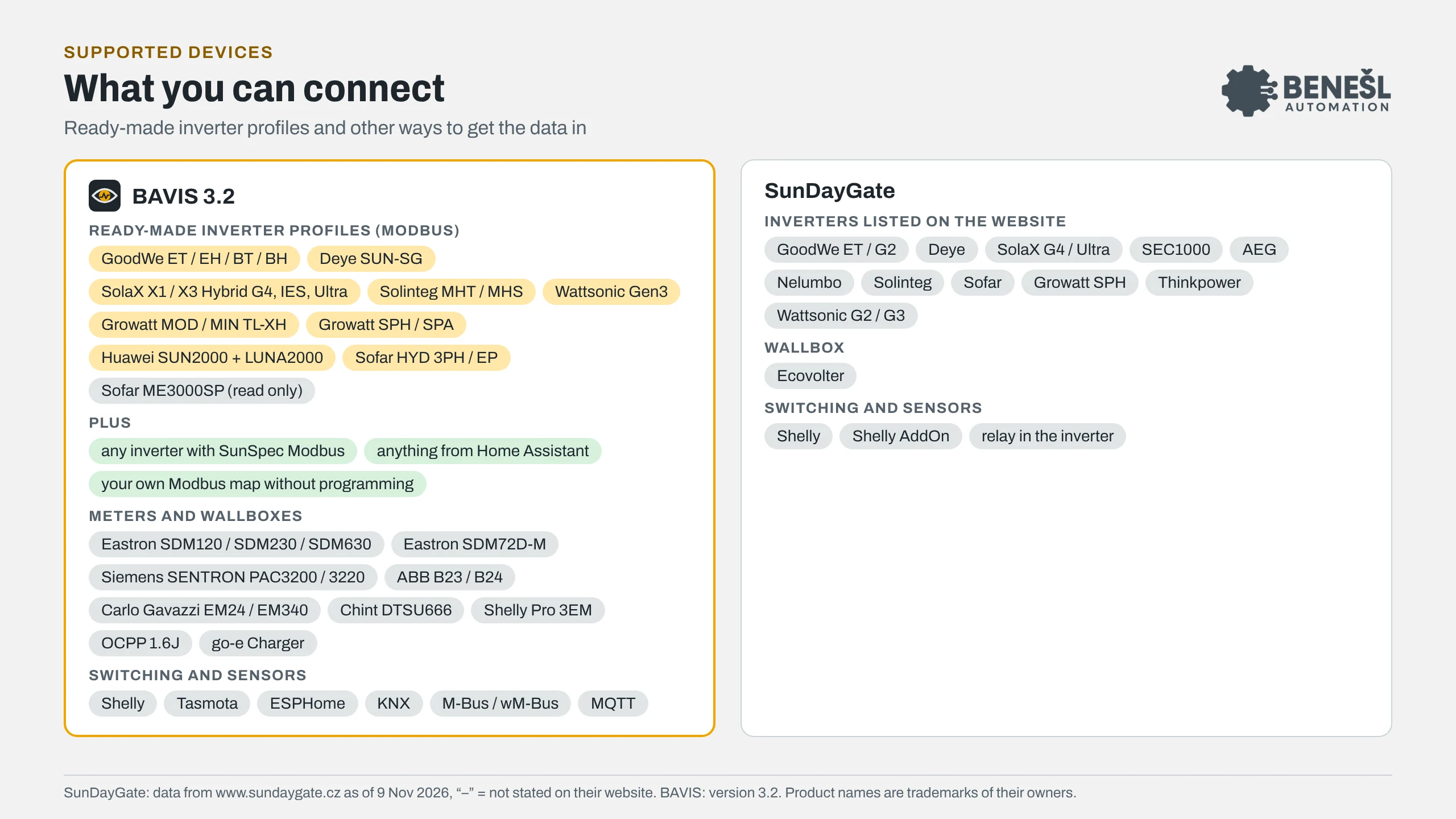
 BAVIS 3.2
Ready-made inverter profiles (Modbus)
Plus
Meters and wallboxes
Switching and sensors
SunDayGate
Inverters listed on the website
Wallbox
Switching and sensors
SunDayGate data are from www.sundaygate.cz as of 9 Nov 2026 (version 9.34); “–” means the website does not state it. BAVIS data apply to version 3.2. Product names are trademarks of their owners. SunDayGate website
To share
The comparison in pictures
The same data as in the tables above. Click a picture to open it in full size.
Frequently asked questions
Can BAVIS control the battery by spot prices?
Yes, from version 3.1. The energy manager loads 15-minute OTE or OKTE prices and the production forecast, charges the battery from the grid in the cheapest hours and blocks export at negative prices. It writes to devices only after you enable control; until then it only gives advice.
Which inverters does BAVIS support?
It has ready-made profiles for GoodWe ET / EH / BT / BH, Deye SUN-SG, SolaX X1 / X3 (Hybrid G4, IES, Ultra), Solinteg MHT / MHS, Wattsonic Gen3, Growatt (MOD / MIN TL-XH, SPH / SPA), Huawei SUN2000 with the LUNA2000 battery and Sofar HYD, with Sofar ME3000SP read only. Other inverters connect via SunSpec Modbus, via Home Assistant or with your own Modbus map without programming.
Does BAVIS need the internet or a cloud?
No. It runs on your Windows computer, and from version 4.0 also on Linux and Raspberry Pi. It only needs the internet to download prices and the weather forecast; control and history stay with you.
How much does it cost for a family house?
For non-commercial home use, energy management is part of the free BAVIS Maker edition, up to 5,000 tags. Commercial use needs a licence, which you can work out in the configurator.
Installation and setup
Want smarter control of your solar power?
Tell us which inverter, battery and loads you have. We will advise you, or install and set up BAVIS turnkey.
Energy and solar sector BAVIS Maker and Home Assistant Work out the licence
The energy manager, OKTE, ripple control, inverter profiles and OCPP have been part of BAVIS since version 3.1. Siemens and SENTRON are trademarks of Siemens AG.